What Is Hashing? MD5, SHA-256, SHA-512 Explained Simply
Hashing is everywhere in computing — passwords, file verification, blockchain, digital signatures. Most people have only a vague sense of what it actually does. Here's a clear explanation.
Hashing Is One of Those Things That Sounds Complicated Until Someone Explains It Properly
You've encountered hashing hundreds of times without realizing it. Every time you log into a website, your password isn't compared to the stored version directly — it's hashed first, and the hashes are compared. Every time you download software and check a SHA-256 checksum, you're using hashing to verify the file wasn't tampered with. Every time a blockchain records a transaction, hashing is what links the blocks together.
Hashing is everywhere in computing and security. And yet most people — even developers — have only a vague sense of what it actually does.
Here's a clear explanation, and a free tool to generate hashes instantly.
What Is Hashing?
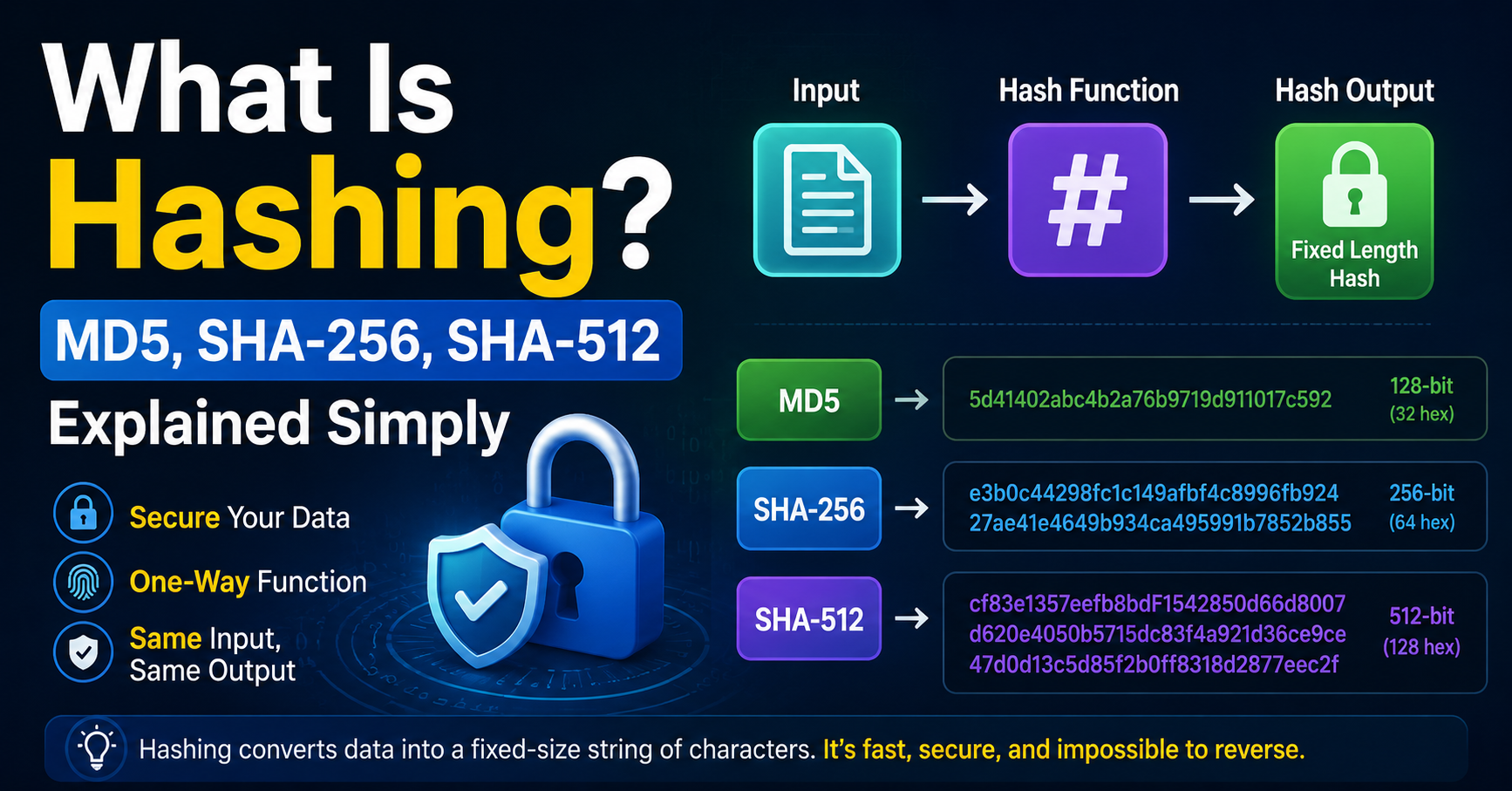
A hash function takes an input — any input, any length — and produces a fixed-length output called a hash, digest, or checksum. The same input always produces the same output. Different inputs produce different outputs (with astronomically rare exceptions called collisions).
What makes hash functions special is that they're one-way. Given an input, you can instantly compute the hash. Given a hash, you cannot work backwards to find the input. There's no "unhash" function. The only way to find what input produced a given hash is to try every possible input until you find a match — which for a good hash function is computationally infeasible.
Think of it like a meat grinder. You can put a steak in and get ground beef out. You cannot put ground beef in and get the steak back. The process is irreversible.
The Main Hash Algorithms Explained
MD5
MD5 produces a 128-bit (32 character) hash. It was designed in 1991 and was the dominant hash algorithm for years. Today, it's considered cryptographically broken — researchers have found ways to intentionally create collisions (two different inputs that produce the same hash).
This means MD5 should never be used for security purposes — not for password storage, not for digital signatures, not for anything where collision resistance matters. It's still used for non-security purposes like quickly checking file integrity in trusted environments, but even there, SHA-256 is a better choice.
MD5 hash of "hello": 5d41402abc4b2a76b9719d911017c592
SHA-1
SHA-1 produces a 160-bit (40 character) hash. It was the successor to MD5 and was widely used until 2017, when researchers demonstrated a practical collision attack called SHAttered. Major browsers and certificate authorities stopped accepting SHA-1 certificates around that time.
Like MD5, SHA-1 is now considered cryptographically weak and shouldn't be used for new security implementations. It still appears in older systems and protocols, and understanding it remains useful for debugging and compatibility work.
SHA-1 hash of "hello": aaf4c61ddcc5e8a2dabede0f3b482cd9aea9434d
SHA-256
SHA-256 is part of the SHA-2 family and produces a 256-bit (64 character) hash. It's the current standard for most security applications — used in SSL/TLS certificates, Bitcoin's proof-of-work algorithm, code signing, and countless other places.
No practical collision attacks are known against SHA-256. It's fast to compute, produces a fixed 64-character output regardless of input size, and is universally supported. For new implementations, SHA-256 is the right default choice.
SHA-256 hash of "hello":
SHA-512
SHA-512 produces a 512-bit (128 character) hash. It's stronger than SHA-256 and actually faster on 64-bit processors because of how the algorithm is designed. It's used when you need the highest level of security — in high-value cryptographic applications, long-term data integrity, and situations where even theoretical future attacks against SHA-256 are a concern.
For most everyday use cases, SHA-256 is sufficient. SHA-512 is for when you need the extra margin.
What Are Hash Functions Actually Used For?
Password storage
This is probably the most important use case from a security perspective. Websites should never store your actual password. Instead, when you create a password, the site hashes it and stores the hash. When you log in, it hashes what you typed and compares the hashes.
If the database is breached, attackers get hashes, not passwords. They can't reverse the hash to get your password. They can try to crack it by hashing millions of common passwords and seeing if any match — which is why weak passwords are still vulnerable even when hashed — but strong random passwords remain secure.
(Good implementations add "salt" — a random value added to the password before hashing — to prevent attackers from using precomputed tables. And they use slow hash functions like bcrypt or Argon2 rather than MD5 or SHA-256, specifically to make cracking slower.)
File integrity verification
When you download software, many sites publish the SHA-256 hash of the download alongside it. After downloading, you compute the hash of the file you received and compare it to the published one. If they match, the file is exactly what the developer published — it wasn't corrupted during download and wasn't replaced by a malicious version.
This is how you verify that a downloaded file is authentic without needing to trust the download channel itself.
Digital signatures
When someone digitally signs a document or piece of software, they don't sign the whole thing — they sign a hash of it. The signature covers the hash, which represents the entire content. This is efficient (signing a 64-character hash is much faster than signing a 500MB file) and equally secure.
Data deduplication
Storage systems use hashing to identify duplicate files. Instead of comparing file contents byte by byte (slow), they compare hashes (fast). If two files have the same hash, they're almost certainly identical, and only one copy needs to be stored.
Blockchain
Each block in a blockchain contains the hash of the previous block. This is what creates the "chain" — changing any block changes its hash, which breaks the link to the next block, which changes that hash, and so on. The chain structure makes the history tamper-evident.
How to Generate a Hash Instantly

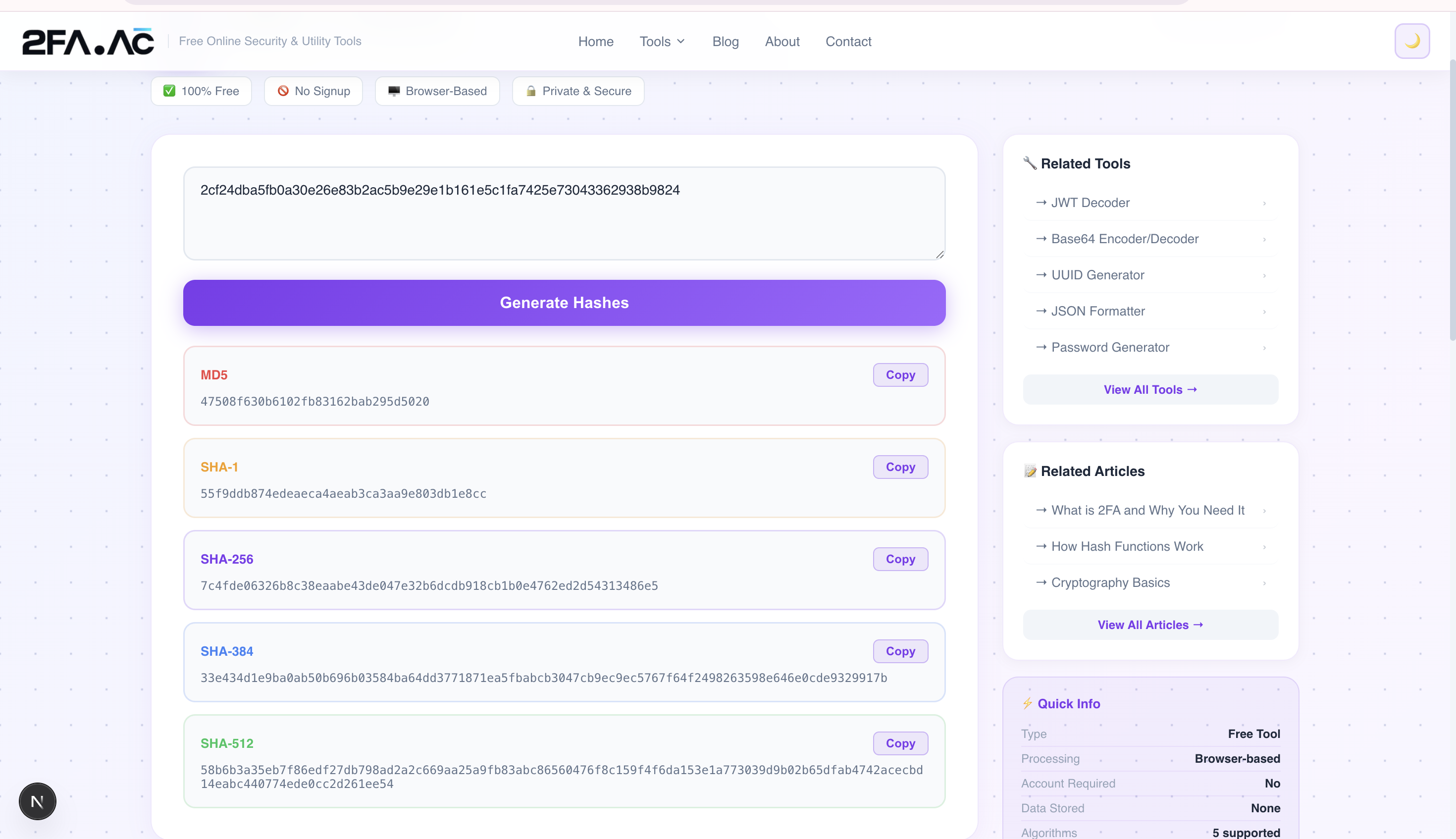
The Hash Generator at 2FA.AC supports MD5, SHA-1, SHA-256, and SHA-512. Using it is straightforward:
Go to the Hash Generator
Type or paste the text you want to hash
Select the algorithm — SHA-256 for most purposes
The hash appears instantly as you type
Copy it with one click
Everything runs in your browser using the Web Crypto API. Your input is never sent to any server.
Practical Uses You Might Not Have Thought Of
Verifying a downloaded file
Download a file. Open the Hash Generator. Drag the file content in (or paste a sample). Compare the SHA-256 output to the one published on the download page. If they match, your download is clean.
Creating a unique identifier for content
If you need a consistent, unique identifier for a piece of text — a document, a configuration, a data record — hashing it gives you a deterministic ID that's the same every time for the same content.
Learning how password hashing works
Hash "password123" and see the output. Then hash "password124" and notice how completely different the output is — one character change, totally different hash. This demonstrates why hashing works for password storage, and why brute-force cracking requires trying each candidate individually.
Checking data consistency
Hash data before and after a process. If the hashes match, the data is unchanged. If they don't, something was modified.
What Hashing Isn't
Hashing is not encryption. Encryption is reversible — you encrypt with a key, and someone with the right key can decrypt to get the original back. Hashing is irreversible — there's no key, there's no decryption, there's no way to get the original back from the hash alone.
Hashing is not compression. Compression reduces file size while preserving the ability to reconstruct the original. Hashing discards the original entirely — you can't reconstruct a 10MB file from its 64-character SHA-256 hash.
Understanding the difference matters when choosing the right tool for a problem. Passwords should be hashed (one-way, no recovery possible). Sensitive files should be encrypted (recoverable with the right key). Both are important; neither replaces the other.
Generate a hash now at 2FA.AC's Hash Generator — supports MD5, SHA-1, SHA-256, and SHA-512. Free, instant, and completely private.
Frequently Asked Questions
Generate a Hash Instantly
MD5, SHA-1, SHA-256, SHA-512 — all supported. Free, browser-based, private.
Generate Hash →